
A Practical Record of My Cybersecurity Journey Through Automation
This post exists as documentation, not marketing.
It is a historical record of what I built, why I built it, and how my thinking around security evolved while doing so. The plugin described here is called Contabo Snapshots, and it reflects a very concrete step in my transition from “managing systems” to thinking defensively about them.
Context
I have been using Contabo VPS servers for several years. Like many operators, I relied on the provider’s control panel to manually generate snapshots when something felt risky: before updates, before experiments, before migrations.
That approach worked. Until it didn’t.
Manual snapshots depend on memory, discipline, and availability. They break under stress, urgency, or routine. From a cybersecurity perspective, that is already a problem.
Backups and snapshots are not convenience features. They are last-resort controls. When everything else fails, they are what stands between recovery and total loss.
That realization is what triggered this project.
Why a WordPress Plugin
At first glance, building a WordPress plugin to manage VPS snapshots sounds unnecessary. There are CLI tools. There are dashboards. There are scripts.
I chose WordPress deliberately.
-
WordPress already provides a hardened, authenticated dashboard
-
It offers role-based access control
-
It runs reliably in environments I already manage
-
It supports cron execution without direct shell access
-
It gives visibility and logging in one place
Instead of adding another server-side script or SSH-based workflow, I reused an environment I already trusted and understood.
This decision was not about convenience. It was about reducing attack surface and operational friction at the same time.
First Version
The first version of Contabo Snapshots was created in May 2025.
Its scope was intentionally small:
-
Authenticate with the Contabo API
-
List available VPS instances
-
Generate snapshots on demand
-
Allow execution via a cron-accessible endpoint
At that stage, the plugin solved an operational pain. It did not yet fully reflect a security mindset. That came later.
Why Snapshots Matter in Cybersecurity
Snapshots are not a replacement for backups. They are different tools with different roles.
From a defensive perspective, snapshots provide:
-
Fast rollback after compromise
-
Protection against destructive changes
-
Recovery from misconfiguration
-
Containment after failed updates
-
Time to investigate incidents without pressure
When ransomware, credential leakage, or accidental data loss happens, the ability to revert infrastructure quickly is not optional.
Without snapshots, recovery becomes slow, manual, and error-prone. With them, response time shrinks dramatically.
That difference is often the line between a controlled incident and a prolonged outage.
Security Improvements Over Time
As my focus shifted more clearly toward cybersecurity, the plugin evolved.
The current version reflects that shift.
Credential Handling
-
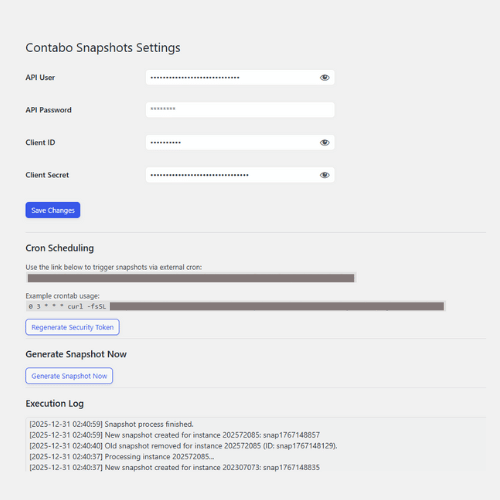
API passwords are never displayed back to the browser
-
Sensitive fields are masked by default
-
Existing credentials are preserved unless explicitly replaced
-
No secrets are exposed in HTML or logs
This reduces the risk of accidental disclosure during screen sharing, browser inspection, or admin misuse.
Token-Based Automation
Automated execution is protected by a unique security token.
-
No token, no execution
-
Tokens can be regenerated if compromised
-
Prevents unauthorized triggering of snapshot creation or deletion
-
Limits abuse of the Contabo API
This turns an exposed endpoint into a controlled interface.
Snapshot Rotation
The plugin enforces snapshot rotation:
-
Old snapshots created by the plugin are removed
-
Only the latest snapshot is kept per instance
This avoids storage exhaustion and prevents a false sense of safety caused by failed snapshot creation due to quota limits.
Security controls that silently fail are worse than no controls at all.
Execution Logging
All operations are logged:
-
Manual executions
-
Automated cron runs
-
API interactions
-
Errors and failures
Logs are stored in the WordPress uploads directory with proper permissions and are visible directly from the plugin interface.
This matters for accountability and forensic thinking. If something goes wrong, there is a trail.
What This Project Represents
Contabo Snapshots is not a commercial product. It is not a framework. It is not a generic solution.
It is a personal artifact.
It marks a point where I stopped thinking only about “how to make systems work” and started asking:
-
What fails first?
-
What happens under attack?
-
What is my recovery path?
-
Where am I depending on habit instead of design?
Cybersecurity is not learned only through courses or theory. It emerges from building, breaking, and revisiting assumptions.
This plugin is one of those checkpoints in my journey.
Closing Note
I am documenting this publicly because security thinking benefits from transparency and reflection. Looking back at why decisions were made is often more valuable than celebrating outcomes.
This post exists so future me can remember why this mattered, not just how it worked.
Technical reference and feature details are documented in the plugin README